BlueMaple HXM Pitstop - Customer
By We Support on July 19, 2023
BeginnerCustomer
A customer, who is sometimes known as a client, to whom we issue Offer based on their request.
Every customer needs to be assigned a unique id. Customer name itself can be the id.
To access the Customer list, go to:
Home > Selling > Customer
1. How to create a Customer
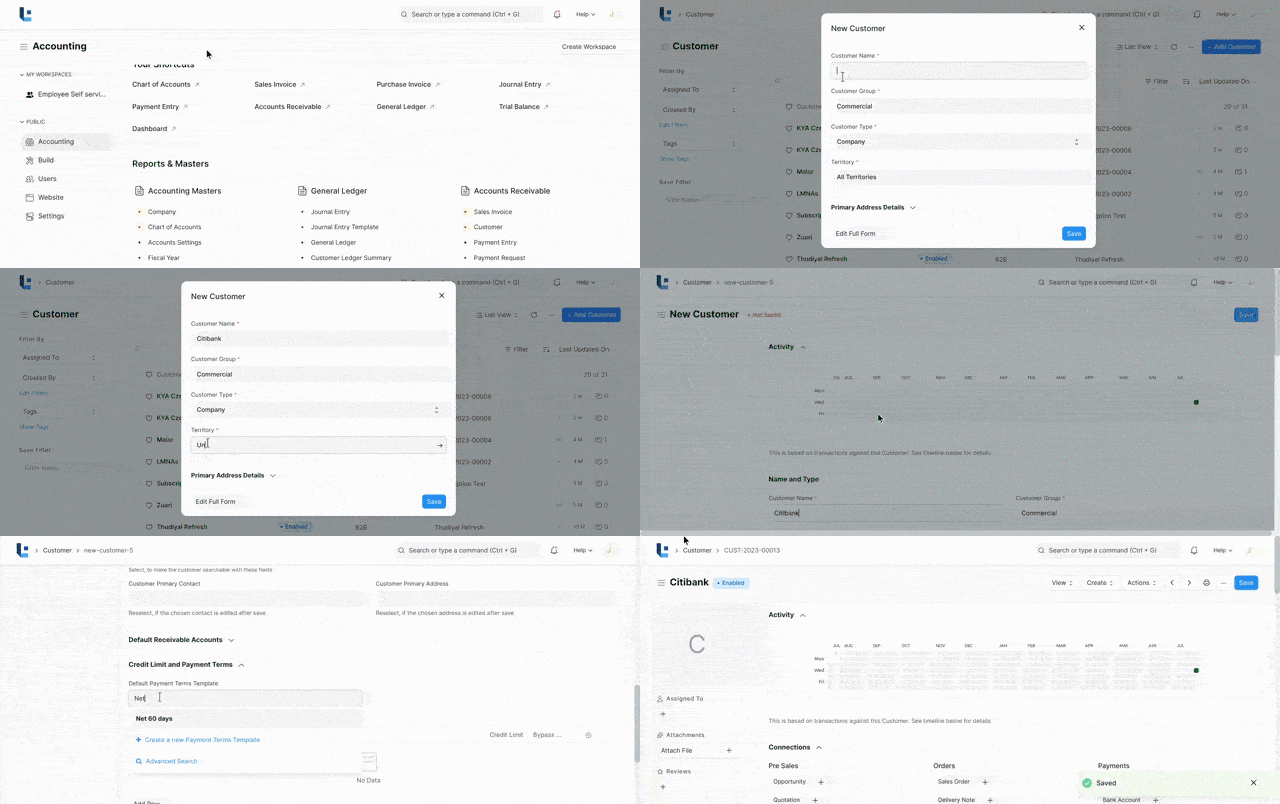
- Go to the Customer list and click on New or click New Customer.
- Enter Full Name of the customer.
- Select Individual if the customer represents an individual or Company if the customer represents a company in Type field.
- Select a Customer group. Individual, Commercial, Non Profit and Government are available by default. You can create additional groups if you need.
- Select the Territory.
- Additionally you can add customer addresses like billing, shipping and customer contacts in the Address and Contacts tab.
- Save
2.Features
Note: Customers are separate from Contacts and Addresses. A Customer can have multiple Contacts and Addresses.
2.1 Multiple Contacts and Addresses
Contacts and Addresses are stored separately so that you can attach multiple Contacts or Addresses to the customer.
2.2 Account Manager
You can assign an Account manager who will be closely working with the customer. By default the logged in user will be assigned as Account Manager.
2.3 Default Currency and Price List
LENS Core supports Multiple Currency and Price Lists.
You can set the default currency to be used for this customer in sales orders and sales invoices by selecting the appropriate currency in Billing Currency.
Similarly, you can set the default price list to be used for this customer in sales orders and sales invoices by selecting the appropriate currency in Default Price List.
2.4 Payment Terms
You can select the default Payment terms to be applied in sales orders and sales invoices in 'Default Payment Terms Template' field.
2.5 Sales Team and Sales Partner
If you have one or more Sales Person to manage the sales to the customer, you can add them in SALES TEAM section. If multiple sales person are involved you can split the contribution among them. Make sure that the sum of all sales persons contribution equals to 100%.
A Sales Partner is a third party distributor / dealer / commission agent / affiliate / reseller who facilitates your products/services sales, for a commission. If you sell your products/services to the customer through a sales partner you can set it in 'Sales Partner' field and mention the 'Commission Rate' for calculation of commission.
More articles on Master Data